Roku Remote: focused control from any local browser
A responsive LAN remote that turns Roku controls, channel launching, device status, and text entry into one focused web interface.
Project overview
Roku Remote is a lightweight browser-based controller for a Roku device
on the local network. It replaces a missing remote—or the friction of
reaching for another app—with a focused interface that works from a
phone, tablet, or desktop browser.
The tool connects directly to Roku's External Control Protocol rather
than relying on a cloud account. Navigation, playback, channel
launching, status, and text entry remain inside the local network.
The goal was not to recreate every television feature. It was to make
the controls people reach for most feel immediate and dependable.
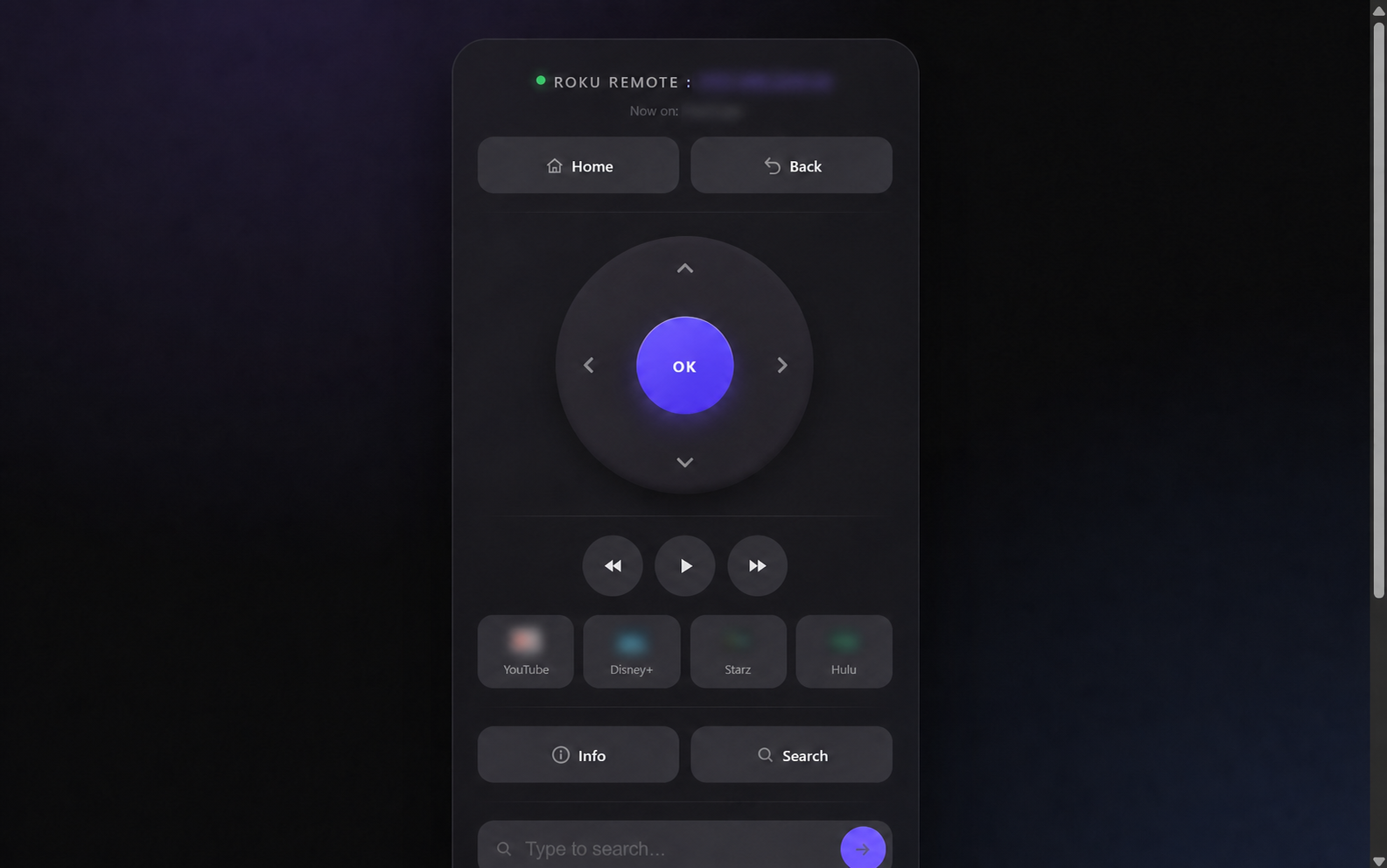
The responsive control surface keeps navigation, playback, channel shortcuts, and search within easy reach. Private network and activity details have been blurred.
The challenge
Hardware remotes are easy to misplace, mobile apps can bury basic
controls, and text entry through a television keyboard is slow. A useful
browser replacement needed to stay fast while handling several
different types of device interaction:
- Directional navigation and selection
- Playback controls
- Frequently used channel shortcuts
- Discovery of installed Roku applications
- Literal text entry for television search fields
- Clear online and current-activity feedback
- Graceful behavior when the device is unreachable
Interaction design
The interface is organized like a physical remote instead of a settings
dashboard. Home and Back establish the primary escape routes. The
directional pad is the visual and interaction center. Playback controls,
favorite channels, Info, Search, and text entry follow in task order.
Large targets make the remote comfortable on touch screens. The narrow
control surface remains readable on desktop without stretching the
interaction across the entire viewport. Live status communicates whether
the device is reachable and what application is active.
Local-first technical design
The application uses PHP, cURL, HTML, CSS, and focused JavaScript. One
PHP entry point serves the interface and a small set of JSON and command
endpoints. Roku commands are sent over the LAN through the device's ECP
API.
The device address and port can be supplied through environment
variables, allowing configuration to change without editing application
logic.
Safety boundaries
- Remote commands are restricted to an explicit allowlist
- Application identifiers are validated before launch requests
- Text length is capped and control characters are removed
- User text is encoded one character at a time for Roku literal input
- Network timeouts prevent an unreachable device from hanging requests
- Browser responses use generic failure states rather than exposing LAN details
- Application icons are proxied through the local application
Dynamic channel controls
Roku Remote can query the device for installed channels and build the
channel grid dynamically. This keeps the interface useful as the device
changes while preserving a small row of familiar shortcuts for the most
common destinations.
Launch requests use Roku-assigned application identifiers rather than
trusting arbitrary paths. Icon requests follow the same validated
boundary.
Better television text entry
The text field addresses one of the most frustrating television
interactions: entering a search phrase with arrow keys. The server
converts a short, validated Unicode string into ordered Roku literal-key
commands with a small delay so the device is not flooded.
This is a small feature with an outsized usability benefit, especially
when the remote is opened from a phone.
Outcome
Roku Remote turns a local device API into a polished, purpose-built
utility. It starts quickly, requires no frontend framework, adapts across
screen sizes, and keeps device communication on the local network.
What this project demonstrates
- Designing a web interface around a familiar physical control model
- Integrating safely with a local-network hardware API
- Combining server-rendered PHP with focused asynchronous interactions
- Validating commands at the application boundary
- Building responsive touch controls without a large dependency stack
- Converting a repetitive household inconvenience into a dependable tool
Use this case study as context, then describe the workflow and outcome that matter to you.
Start a conversation